Reuse device registration
apps/mobile/lib/push.ts
The app asks for permission, registers the device, and revokes its token at sign-out.
An Expo app for iOS and Android on the same backend, the same sessions, and the same typed contract as the web app. One product, not two to keep in step.


guardrails your AI agents followso their code fits the repository boundaries
the app your customers log intoit runs the minute you clone it
sign-up, teams, payments, emailworking on day one, not stubbed
your productthe only part left to build
one repo with the boring parts already finishedso you start on what makes your product different
What actually goes wrong.
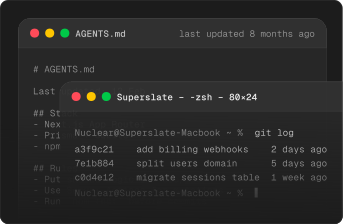
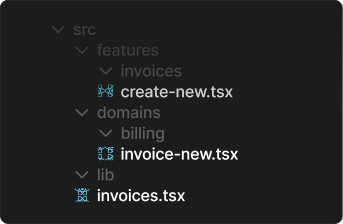
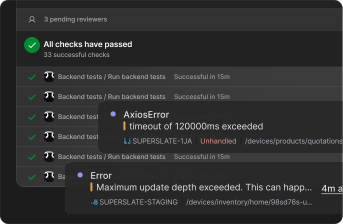
They break it gradually: reading context nobody maintained, inventing a route through the code, and passing every check on the way to a regression you find two weeks later.
A first task for your coding agent
Your agent can build on the push notifications already wired into the app. You decide when the alert goes out and which screen opens when a customer taps it.
apps/mobile/lib/push.ts
The app asks for permission, registers the device, and revokes its token at sign-out.
apps/mobile/app/settings/notifications.tsx
Customers choose which alerts they receive. New notifications can use the same preferences as the inbox and email.
apps/mobile/hooks/useNotificationResponse.ts
Your agent has one place to connect a tap on the notification to the screen it belongs to.
Follow the device checklist to verify delivery, tap through to the app, and confirm alerts stop after sign-out.
Someone who signs up on the web can open the app on their phone and find the same team and subscription. You get both clients and the API they share.
personal + team
 51 components
inbox + email
 i18next · en · es · de
 Postgres FTS
on by default
Postgres-backed
Customize the app and use it for every product you own.
Add a field to the shared API and both clients pick up its type. Web and mobile share accounts, subscriptions, and a backend you deploy once.
mobile
The native app calls the web app’s Hono API. Better Auth handles sessions on both platforms.
frontend
React 19 SPA
Build dashboard screens in React. The browser calls a separate API that can also serve a native app.
contracts
Define a field once. The server validates incoming data and the client uses the same schema for its types.
api
Trace a request from its route to the service that handles it and the SQL that reads or writes the data.
runtime
Run API tests locally and compile the same server code into a standalone executable.
database
Read each schema change as SQL. Up and down migrations let you inspect changes in both directions.
Use EAS to build for iOS and Android and submit through your own store accounts. Host the shared API on Railway, AWS, or Google Cloud. You can choose your host during setup or later.
Hosting optionsGenerated configuration
| backend | native frontend | Cloudflare frontend | API | database | config |
|---|---|---|---|---|---|
 AWS |  S3 +  CloudFront |  Cloudflare |  ECS Fargate +  ALB |  RDS PostgreSQL 18 |  OpenTofu |
 GCP |  GCS +  Cloud CDN | Cloudflare |  Cloud Run |  Cloud SQL PostgreSQL 18 | OpenTofu |
 Railway | — | Cloudflare | Railway service | Railway PostgreSQL | railway.toml |
Pay once for the source. Buy as an individual or cover your whole company, with no per-developer fees or runtime royalties.
For a product on web, iOS, and Android. Includes the React + Hono edition.
One-time price
$199Standard price $299
First 50 licenses at this price. Then $249.
Buy ExpoReact + Hono, TanStack Start, and Expo.
One-time price
$249Standard price $399
First 50 licenses at this price. Then $329.
Buy All-accessBoth licenses include updates while we maintain and distribute your editions. Already own an edition? Use the one-time code in your license email for credit toward All-access, with at least $49 to pay. The license excludes client work and source redistribution. Read the full license.
No. Expo includes the React web app, Hono API, and Postgres backend. You can launch on the web and add the native apps when you’re ready.
Yes. Better Auth handles both clients. The native app stores its session securely and uses the same account and subscription as the web app.
Checkout runs on the web. The mobile app reads subscription access from the API. You’ll need to add native purchasing if your store release requires it.
Your receipt includes a license key. Run pnpm dlx superslate@latest my-app and enter the key. The tool verifies the release, applies your brand, and installs the project on your machine.
One license covers one person or company and unlimited products that buyer owns. Your whole development team can use it. Separate companies need their own licenses, and client delivery is outside the license.
Yes. Claude Code, Codex, and Cursor can read the repo instructions and run the same checks you do. You can also build everything by hand.
Yes. Every edition includes an Astro marketing site that shares the app’s colors and typography. Change the sample copy, add your terms, and publish it separately on Cloudflare.
Sales are final once source access is delivered, subject to your statutory rights. If delivery fails or you see a duplicate charge, contact support with your order ID.
Get your license key at checkout. Then run pnpm dlx superslate@latest my-app to create a project with your name on it.
 Expo Router
 Better Auth
 Polar
 Stripe
 Dodo
 Zod
 dbmate
 React Email
 Resend
 R2
 Sentry
 pino
 vite-plugin-pwa
 Bun
 Vitest
 Fumadocs
 llms.txt
 Astro
 Workers
 TypeScript
 Hono