Keep billing decisions on the server
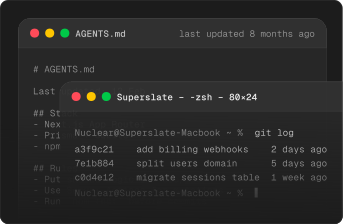
apps/start/AGENTS.md
Do not grant billing access from anything but a verified webhook.
Your agent can reuse the subscription state the Worker already checks.
TanStack Start renders every page at the edge, server functions replace the API, and D1 holds the data. One Worker, one deploy command.


guardrails your AI agents followso their code fits the repository boundaries
the app your customers log intoit runs the minute you clone it
sign-up, teams, payments, emailworking on day one, not stubbed
your productthe only part left to build
one repo with the boring parts already finishedso you start on what makes your product different
What actually goes wrong.
They break it gradually: reading context nobody maintained, inventing a route through the code, and passing every check on the way to a regression you find two weeks later.
A first task for your coding agent
Your agent has a server function to follow, a subscription check to reuse, and tests for what happens when a customer cancels. It can run those tests against D1 before you deploy.
apps/start/AGENTS.md
Do not grant billing access from anything but a verified webhook.
Your agent can reuse the subscription state the Worker already checks.
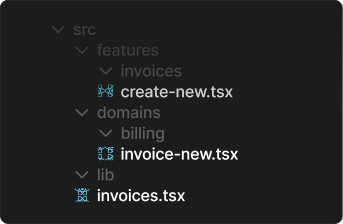
apps/start/docs/architecture.md
The guide shows where to validate a request, check team permissions, and read from D1.
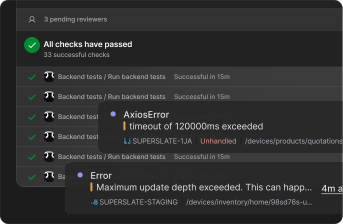
apps/start/tests/billing.test.ts
Run the existing tests for duplicate webhooks, canceled subscriptions, and expired plans.
pnpm typecheck
The app checks that its query types match the migrations, then checks the TypeScript that uses them.
Your customers can create an account, invite a teammate, and manage a subscription. The pages and server functions for those flows ship together.
personal + team
on by default
 Workers bindings
Customize the app and use it for every product you own.
Pages and server functions share a Worker. Follow a form submission from the React screen to the D1 query that saves it.
framework
Render pages on the server and call typed server functions directly from the app.
contracts
Validate submitted data with shared schemas so forms and server functions agree on the input.
runtime
One Worker handles page requests, billing webhooks, and nightly cleanup.
database
Query D1 with typed SQL. Atomic batches keep related writes together.
tests
Run tests in the Workers runtime against local D1 with the same migrations you deploy.
Once your Cloudflare account and D1 database are configured, pnpm deploy:worker builds the app, applies its migrations, and publishes the Worker.
What runs on CloudflareWrangler
Pay once for the source. Buy as an individual or cover your whole company, with no per-developer fees or runtime royalties.
For a server-rendered web product on Cloudflare Workers and D1.
One-time price
$149Standard price $249
First 50 licenses at this price. Then $199.
Buy TanStack StartReact + Hono, TanStack Start, and Expo.
One-time price
$249Standard price $399
First 50 licenses at this price. Then $329.
Buy All-accessBoth licenses include updates while we maintain and distribute your editions. Already own an edition? Use the one-time code in your license email for credit toward All-access, with at least $49 to pay. The license excludes client work and source redistribution. Read the full license.
Choose it when you want server-rendered pages and app logic on Cloudflare. React + Hono suits a dashboard with a separate API and Postgres.
Cloudflare manages the database. D1 uses SQLite and supports atomic batches for related writes. If your product needs interactive transactions or Postgres extensions, choose React + Hono.
You get repo instructions, an architecture guide, and tests that run against local D1. The evaluation harness and optional MCP server come with the React + Hono foundation.
Your receipt includes a license key. Run pnpm dlx superslate@latest my-app and enter the key. The tool verifies the release, applies your brand, and installs the project on your machine.
One license covers one person or company and unlimited products that buyer owns. Your whole development team can use it. Separate companies need their own licenses, and client delivery is outside the license.
Yes. Every edition includes an Astro marketing site that shares the app’s colors and typography. Change the sample copy, add your terms, and publish it separately on Cloudflare.
Sales are final once source access is delivered, subject to your statutory rights. If delivery fails or you see a duplicate charge, contact support with your order ID.
Get your license key at checkout. Then run pnpm dlx superslate@latest my-app to create a project with your name on it.
 Better Auth
 Polar
 Stripe
 Dodo
 TanStack Start
 Zod
 D1
 Kysely
 Resend
 Zag.js
 CSS Modules
 Vitest
 Astro
 React 19
 TypeScript